Slope Rider 3D

Slope Rider 3D

Slope Rider 3D

Slope Rider 3D is an Azgames endless sled runner on procedurally generated icy 3D slopes. You steer left and right, jump over hazards, and try to survive as speed and obstacle density rise. Gift boxes unlock 20+ sleds with different handling—speed, grip, and jump behavior—not just new looks. Pick Normal mode for a gentler curve or Hard mode when you want faster pace and tougher terrain from the start.

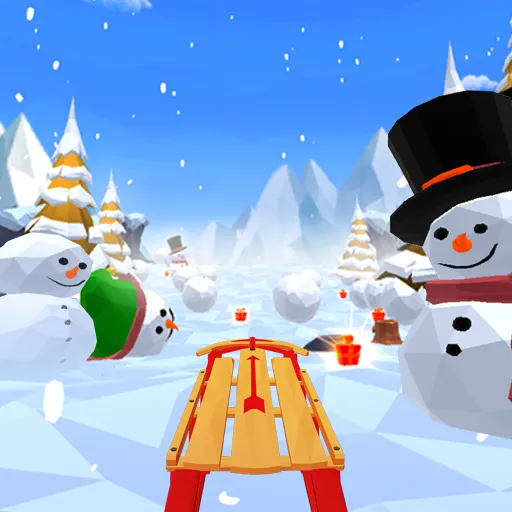
Slope Rider 3D fits players who want full 3D winter atmosphere with fog and weather on top of classic downhill dodging. Trees, logs, gaps, snowmen, boulders, and fog appear in shifting combinations, and the slope layout changes every run. Compared with Snow Rider on this site, Slope Rider 3D emphasizes mode choice, 3D visuals, and sled handling differences tied to gift unlocks rather than a fixed cosmetic sled list alone.

How to Play Slope Rider 3D

1
Steering the sled on the slope in Slope Rider 3D

Start Slope Rider 3D and pick a mode

Open the play area on this page and wait for Slope Rider 3D to load. Choose Normal mode for a gentler speed curve or Hard mode if you want faster pace and trickier terrain from the first second. Your sled begins moving downhill immediately—there is no stage select after that.

2

Steer and jump on the slope

Left / Right Arrow or A / D: Steer. Up Arrow or W: Jump. Some versions also use Space to jump.
3

Collect gifts when the line is clear

Gift boxes appear along the slope in Slope Rider 3D; some sit on safer center lines, others on risky edges. Grab them when you have room—wiping out for one box usually costs more gifts than you gain. Surviving longer tends to earn more gifts than chasing a single risky pickup.

4

Unlock sleds and beat your distance

Spend collected gifts to unlock new sleds�?0+ in total—with different speed, grip, and jump feel. Test unlocked sleds in Normal mode before pushing Hard mode. After a crash, restart Slope Rider 3D and aim for a farther run as speed ramps with distance.

Slope Rider 3D gameplay loop

A Slope Rider 3D session is one continuous downhill run. After you pick Normal or Hard mode, the sled keeps moving on a procedurally generated icy slope; your goals are to steer clear of hazards, jump when gaps and logs require it, and collect gift boxes when the path allows. Terrain and obstacle placement change between attempts, so Slope Rider 3D rewards reading the slope ahead rather than memorizing a fixed route.

When you crash, the run ends and you can restart immediately. Distance and survival time are the score; gifts feed the sled unlock list, which adds a light progression layer without changing the one-crash-and-done core loop.

Controls and common mistakes in Slope Rider 3D

  • Oversteering at high speed: Holding left/right too long in Slope Rider 3D slides you into trees or off narrow paths. Use small, early corrections.
  • Jump timing: Jump too early or too late on logs and gaps and you still crash. Commit when the hazard is readable, not when panic sets in.
  • Ignoring fog: Fog limits visibility in Slope Rider 3D—slow your steering inputs and look farther ahead when weather hits.
  • Gift greed: Diving for a box beside a boulder or gap is a common wipeout. Skip risky gifts and stay alive.

Gifts, sled unlocks, and distance strategy

In Slope Rider 3D, gifts are both trail pickups and the currency for 20+ unlockable sleds with different handling. Because sled choice can affect speed, grip, and jump distance, test new unlocks in Normal mode before Hard runs. The reliable strategy is survival first: centered line when possible, early reads on rolling logs and gaps, and steady gift collection across many runs.

Hard mode starts fast—do not chase every gift on the opening stretch. Settle your steering rhythm, then protect the long mid-run where most distance is earned as Slope Rider 3D speeds up.

Slope Rider 3D vs similar games on this site

  • Slope Rider 3D vs Snow Rider: Both are gift-collecting winter sled runners. Slope Rider 3D adds Normal/Hard modes, 3D fog, procedural slopes, and handling-based sled unlocks; Snow Rider emphasizes free steering plus jump with a published gift-cost sled list and breakable fences.
  • Slope Rider 3D vs Snow Road: Snow Road stresses lane changes and rising speed with distance; Slope Rider 3D uses free left/right steering plus jump on icy 3D slopes with mode selection.
  • Slope Rider 3D vs Slope Legacy: Slope Legacy is a neon ball runner with left/right only and red instant-fail blocks—no sled gifts or jump. Choose Slope Rider 3D for winter sledding; choose Slope Legacy for ball control.

Play Slope Rider 3D in the embed above. This site is an independent fan page and is not affiliated with Azgames or other original publishers.

FAQs about Slope Rider 3D

Hitting obstacles ends the run immediately—trees, rolling logs, snow boulders, gaps, cliffs, narrow paths, and snowmen. Fog can limit visibility and make those hazards harder to read. There are no lives; one crash sends you back to try Slope Rider 3D again.
On PC: left/right arrows or A/D to steer; up arrow or W to jump (some builds also use Space to jump). On mobile, use on-screen controls when your Slope Rider 3D version supports them. Avoid every listed hazard—contact ends the run.
Normal mode in Slope Rider 3D eases you in with a gentler speed curve and layout. Hard mode starts faster and throws more obstacles and trickier terrain from the beginning. Use Normal to learn sled handling; switch to Hard when you want a stiffer test.
Yes. Slope Rider 3D sleds unlocked with gifts offer different speed, grip, and jump behavior—not just appearance. Some favor top speed, others stability on tight turns or better jump distance for large gaps. Try a few in Normal mode before committing to Hard.
Slope Rider 3D raises speed and difficulty as you go farther. Obstacles appear in denser random combinations, and fog can reduce visibility. Early sections teach rhythm; late distance demands earlier steering and jump reads.
Both are winter downhill sled runners with gifts and jumps. Slope Rider 3D (Azgames) adds explicit Normal/Hard modes, 3D fog and weather, procedurally generated slopes, and 20+ sleds with handling differences. Snow Rider on this site lists a fixed gift-cost sled set and breakable wooden fences. Try both if you want to compare feel.