Snow Road 3D

Snow Road 3D

Snow Road 3D

Snow Road 3D is a 3D endless sled racer on icy mountain slopes: you steer downhill, jump when needed, and try to survive as speed builds. Pine trees, stumps, rocks, rolling snowballs, giant snowmen, and gaps end a Snow Road 3D run on contact—there are no lives or checkpoints, just distance and reflexes.

Gift boxes along the route unlock more than ten sleds in the shop, with costs from 50 to 200 gifts; the Santa sled sits at the premium end at 200 gifts. Compared with Snow Rider or Sled Rider on this site, Snow Road 3D leans into a 3D mountain view and a steady speed climb the farther you go—same winter dodging idea, different pacing and unlock range.

How to Play Snow Road 3D

1
Sled racing down a snowy mountain in Snow Road 3D

Start a Snow Road 3D run

Open the play area on this page and wait for Snow Road 3D to load. Press Space or tap the screen to start. The sled moves forward automatically and picks up speed over time—your job is to stay on the track and avoid anything that ends the run.

2
Game controls in Snow Road 3D

Game controls

PC
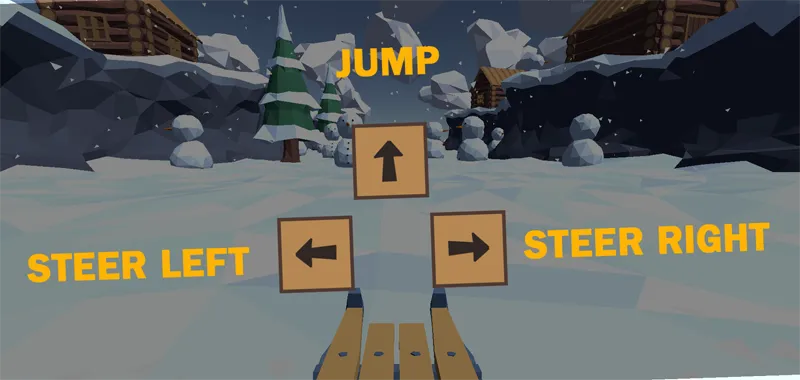
A / D or / : Steer left / right.  W or : Jump.  Space: Start / restart.
3

Steer, jump, and dodge

In Snow Road 3D, A/D or arrow keys steer left and right; W or up arrow jumps. Watch for pine trees, stumps, rocks, rolling snowballs, snowmen, and gaps—hitting any of them ends the run. As speed rises, read a few obstacles ahead instead of reacting at the last second.

4

Collect gifts and unlock sleds

Gift boxes in Snow Road 3D fund shop unlocks costing 50 to 200 gifts depending on the sled. The Santa sled is the premium unlock at 200 gifts. Grab boxes only on clear lines; skipping a risky pickup and surviving longer usually beats one dangerous swerve.

Snow Road 3D gameplay loop

A Snow Road 3D session is one continuous downhill run. After Space or a tap starts the sled, it keeps moving and gradually speeds up; your goals are to dodge hazards and collect gift boxes when the line is safe. Obstacle mixes change between attempts, so Snow Road 3D rewards reading the slope ahead rather than memorizing one layout.

When you crash, the run ends and you can restart right away. Distance and survival drive score; gifts feed the shop with more than ten unlockable sleds. That light progression sits on top of the same one-crash loop every time you open Snow Road 3D.

Controls and common mistakes in Snow Road 3D

  • Over-steering at speed: Holding A or D too long in Snow Road 3D slides you into trees or gaps once pace climbs. Use short taps.
  • Late jumps: Waiting until a snowball or gap is under the sled often clips the hazard. Jump a beat early when the landing looks clear.
  • Edge riding: Hugging one side of the track cuts escape room. Stay nearer center when the path opens up.
  • Gift greed: Swerving for a box beside a snowman cluster is a common Snow Road 3D wipeout. Skip it and stay alive.

Gifts, sled unlocks, and score strategy

In Snow Road 3D, gifts are trail pickups and shop currency. Unlock costs run from 50 to 200 gifts, with the Santa sled at 200 as the premium cosmetic target. Because sled choice does not change physics, strategy is consistency: centered lines when possible, early reads on rolling snowballs, and steady collection across many runs.

If you are saving for the Santa sled in Snow Road 3D, favor long safe runs over risky side lines. One clean distance push often earns more gifts than several short crashes chasing a single box.

Snow Road 3D vs similar games on this site

  • Snow Road 3D vs Snow Rider: Both are gift-unlock sled runners. Snow Road 3D highlights 3D slopes, rising speed with distance, and shop sleds from 50–200 gifts. Snow Rider lists breakable wooden fences and its own gift-cost roster. Pick Snow Road 3D for the 3D pace curve; pick Snow Rider for its specific obstacle set.
  • Snow Road 3D vs Sled Rider: Sled Rider (Azgames) adds daily missions, 21 sleds, and gift costs up to 5,000—with no brake once a run starts. Snow Road 3D stays in the 50–200 gift band with 10+ sleds. Choose Sled Rider for mission grinds; choose Snow Road 3D for a tighter unlock ladder.
  • Snow Road 3D vs Slope Snowball: Slope Snowball is an inertia snowball on tilting lanes with cookie/gift skins—not a sled. Open Snow Road 3D when you want downhill steering and jumps; open Slope Snowball for ball physics.

This page hosts a playable Snow Road 3D embed plus the guide above. SnowRider3dGame.org is an independent site and is not affiliated with the original game publishers.

FAQs about Snow Road 3D

Hitting obstacles or falling through gaps ends a Snow Road 3D run immediately. Hazards include pine trees, tree stumps, rocks, rolling snowballs, giant snowmen, and drop-offs. There are no extra lives—one crash sends you back to start another run.
Press Space or tap to start. Steer with A/D or left/right arrows; jump with W or the up arrow. On mobile, tap the screen to control the sled in the browser version of Snow Road 3D.
Gift boxes collected during Snow Road 3D runs go to the in-game shop. Sleds cost between 50 and 200 gifts; the Santa sled is the premium unlock at 200 gifts. Sleds are mainly cosmetic—higher gift cost does not make a sled faster or safer.
Yes. The sled accelerates gradually the longer you survive in Snow Road 3D. There are no fixed levels—speed keeps climbing until you crash, so late-run dodging needs faster reads and shorter steering corrections.
Snow Road 3D offers more than ten sled variants in the shop, unlocked with gifts earned on the route. Costs span 50 to 200 gifts per model, with the Santa sled at the top of that range as a long-term target—not a required pick for distance.
Both are winter downhill sled games with gift unlocks. Snow Road 3D uses a 3D mountain perspective, lists stumps and snowmen among hazards, and ties difficulty to rising speed over distance. Snow Rider emphasizes free steering plus jump with a separate gift-cost sled list. Try both to compare feel.